Connect an AI agent to your knowledge
In this quickstart, you give an AI agent access to the knowledge you indexed in Index your first source: you set up an MCP server over your project and hand it to an LLM as a search tool. We keep the agent as simple as possible, so the whole quickstart fits in one curl command. Your real agent will be more than that, but its relationship to your knowledge stays the same: search as a tool.
By the end, you will have:
- A hosted MCP server exposing search over everything your project has indexed.
- An agent that searches your knowledge and answers from it, in a single API call.
Before you start
Before you start, you should have:
- A project with indexed sources, for example from Index your first source.
curlandjq.curlcomes preinstalled on most operating systems; installjqwith your package manager, for examplebrew install jqon macOS.- An Anthropic or OpenAI API key, for the agent side of the call.
Create your MCP server
- In Kapa, click Integrations > + Add new integration.
- Choose Hosted MCP Server.
- Click Continue.
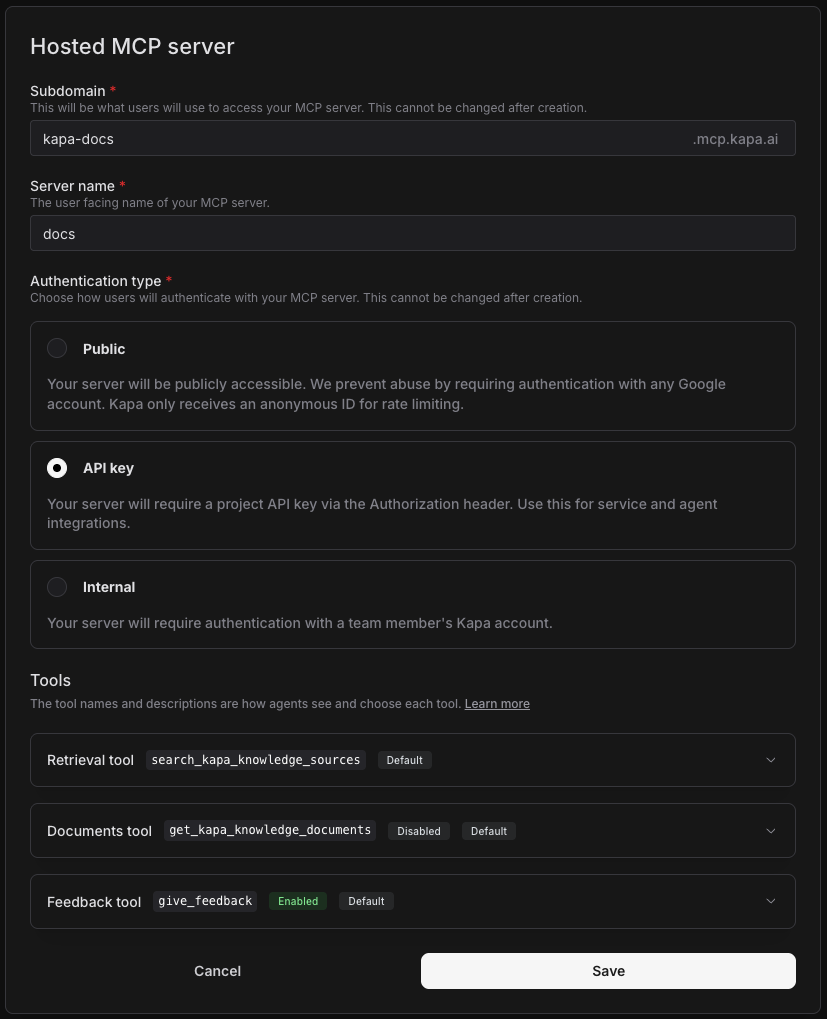
- Configure the Subdomain: This becomes the first part of the URL clients use to connect to your MCP server, in the form
<subdomain>.mcp.kapa.ai. Subdomains are globally unique, so pick one related to your product name. - Configure the Server name. This becomes the MCP server label (server_name / serverLabel) that clients see when listing or calling tools from this server; it does not affect the URL or subdomain.
- Choose the Authentication type.
For this quickstart, set the Server name to docs and choose API key as the authentication type. The other authentication types are for offering the server to people in their AI tools, such as Claude Code, Cursor, or ChatGPT; the Hosted MCP server page covers them.
Click Save, then copy the server URL with Copy MCP server URL in the integration row's Actions column. It has the form https://<subdomain>.mcp.kapa.ai.
Your server's tools
Your MCP server exposes three tools to agents. The primary one is search_<PRODUCT_NAME>_knowledge_sources, in this walkthrough search_kapa_knowledge_sources, the tool this quickstart uses: it takes a question or a task, performs agentic retrieval over all the sources indexed in your project and returns the most relevant chunks to the caller: each chunk is a short, self-contained snippet of text from a single document in your knowledge base, and the list comes back as Markdown. This is how you give context from your knowledge to your agents.
Create an API key
The server authenticates requests with a project API key:
- Navigate to API Keys (under Deploy in the sidebar) and click Add new API key.
- Copy the key.
Run your agent
An agent is an LLM running in a loop. You give it a task and some tools; on each pass through the loop, the model thinks about where it stands and either uses a tool or, once it knows enough, answers. If you have watched a coding agent work, the answer taking shape through a series of searches and commands, you have watched exactly this loop.
Normally, running that loop is your application's job: one API call to the LLM per pass, executing the tool calls in between. With tools served over MCP, you can skip all of that: both Anthropic's Messages API and OpenAI's Responses API connect to a remote MCP server directly and run the loop themselves, the model searching and reading results as often as it needs, inside a single API call. Your knowledge is exactly such a server, which is why this whole quickstart fits in one curl command.
Before running the command, make it yours: set the server URL to the one you copied when creating your MCP server, replace <KAPA_API_KEY> with the API key you just created, and <ANTHROPIC_API_KEY> or <OPENAI_API_KEY> with your provider key. If you indexed your own site instead of the Kapa documentation, adapt the system prompt and the tool name (search_<PRODUCT_NAME>_knowledge_sources) to your product as well.
Then ask something the site you indexed can answer; if you followed along with the Kapa documentation, try the question below. A run costs at most a few cents.
- Anthropic
- OpenAI
SYSTEM_PROMPT="You are a support agent for Kapa. Answer questions using your search \
tool over the Kapa documentation. If a search turns up nothing relevant, \
politely say you do not know."

curl https://api.anthropic.com/v1/messages \
  -H "Content-Type: application/json" \
  -H "X-API-Key: <ANTHROPIC_API_KEY>" \
  -H "anthropic-version: 2023-06-01" \
  -H "anthropic-beta: mcp-client-2025-11-20" \
  -d '{
    "model": "claude-sonnet-5",
    "max_tokens": 4096,
    "thinking": {"type": "adaptive"},
    "system": "'"$SYSTEM_PROMPT"'",
    "messages": [{"role": "user", "content": "How often do web crawls refresh?"}],
    "mcp_servers": [
      {
        "type": "url",
        "url": "https://kapa-docs-test.mcp.kapa.ai",
        "name": "kapa",
        "authorization_token": "<KAPA_API_KEY>"
      }
    ],
    "tools": [
      {
        "type": "mcp_toolset",
        "mcp_server_name": "kapa",
        "default_config": {"enabled": false},
        "configs": {"search_kapa_knowledge_sources": {"enabled": true}}
      }
    ]
  }' | jq '.content[]'
The MCP connector is in beta on the Anthropic API, enabled by the anthropic-beta: mcp-client-2025-11-20 header. Each parameter plays a part:
model: which model answers.claude-sonnet-5is Anthropic's balanced mid tier.max_tokens: the ceiling on how much the model may generate, required on every request.thinking:adaptivelets the model decide whether a question warrants thinking at all. When it does think, the thinking appears in the response as readablethinkingblocks; a question as simple as this one it often answers without.system: the system prompt, setting the role the model plays for this request.messages: the conversation so far, here just the user's question.mcp_servers: the MCP servers the model may use; the Messages API calls them on your behalf.urlis the address you copied earlier, andauthorization_tokencarries your Kapa project API key so the server accepts those calls.tools: what the model can do besides generate text. Themcp_toolsetentry enables your server's tools, restricted here to the search tool.
What comes back in the response's content array is all the steps the model took to complete the task you gave it, in order. The jq filter prints them one by one.
SYSTEM_PROMPT="You are a support agent for Kapa. Answer questions using your search \
tool over the Kapa documentation. If a search turns up nothing relevant, \
politely say you do not know."

curl https://api.openai.com/v1/responses \
  -H "Content-Type: application/json" \
  -H "Authorization: Bearer <OPENAI_API_KEY>" \
  -d '{
    "model": "gpt-5.6-luna",
    "reasoning": {"effort": "low"},
    "instructions": "'"$SYSTEM_PROMPT"'",
    "tools": [
      {
        "type": "mcp",
        "server_label": "kapa",
        "server_url": "https://kapa-docs-test.mcp.kapa.ai",
        "authorization": "<KAPA_API_KEY>",
        "allowed_tools": ["search_kapa_knowledge_sources"],
        "require_approval": "never"
      }
    ],
    "input": "How often do web crawls refresh?"
  }' | jq '.output[]'
Each parameter plays a part:
model: which model answers.gpt-5.6-lunais OpenAI's inexpensive tier, good enough for a quickstart.reasoning: how hard the model thinks before acting;lowkeeps cost and latency down.instructions: the system prompt, setting the role the model plays for this request.tools: what the model can do besides generate text. The Responses API lets you provide tools directly over MCP, and OpenAI calls the server on your behalf. The single entry is your MCP server:server_urlis the address you copied earlier,authorizationcarries your Kapa project API key so the server accepts those calls,allowed_toolslimits the model to the search tool, andrequire_approval: "never"lets the model call the tool directly instead of pausing to ask you for approval first.input: the user's question.
What comes back in the response's output array is all the steps the model took to complete the task you gave it, in order. The jq filter prints them one by one.
Read the response
Here is what the agent returned on an example run, abridged for readability.
- Anthropic
- OpenAI
First, the agent decides to search your knowledge; an mcp_tool_use block carries the query:
{
  "type": "mcp_tool_use",
  "name": "search_kapa_knowledge_sources",
  "input": { "query": "How often do web crawls refresh?" },
  "server_name": "kapa"
}
The matching mcp_tool_result block carries what the tool returned: the chunks, one text entry each. Here abridged, the second entry in full:
{
  "type": "mcp_tool_result",
  "tool_use_id": "mcptoolu_01XGAFGF1S4zmHqLpuMUUAnY",
  "is_error": false,
  "content": [
    {
      "type": "text",
      "text": "# Data-sources\n## Data refresh frequency\n\nDifferent data sources have..."
    },
    {
      "type": "text",
      "text": "# Data-sources\n## Content updates\n\nOnce configured, Kapa automatically re-crawls your websites daily and syncs any changes (see [Refreshes](https://docs.kapa.ai/data-sources/refreshes) for more details)."
    },
    { "type": "text", "text": "..." }
  ]
}
Each entry is one chunk; unescaped, the first one starts like this:
# Data-sources
## Data refresh frequency

Different data sources have different data refresh schedules. The **Last
checked** column in the **Sources** view shows when Kapa last checked each
source for changes.

...

### Web crawling

Every 24 hours, Kapa re-crawls all pages on your configured websites and
compares each page's content against what was previously ingested.
...
The tool result is injected back into the LLM: the retrieved chunks are now part of its context, knowledge from your sources it did not have before. From them, the model formulates the final answer. A text block carries it:
Web crawls refresh every 24 hours by default. Here's how it works:

Refresh schedule: Every 24 hours, Kapa re-crawls all pages on your configured
websites and compares each page's content against what was previously ingested
(new content, updates, and deletions are all handled on this same 24-hour
cycle).
...
Read top to bottom, it is the whole agentic exchange: the model decides to search, reads the chunks that come back, and writes its answer from them. For harder questions it searches several times, reformulating the query as it goes, and when a question warrants thinking, readable thinking blocks appear as well. That is an agent using your knowledge.
First, the agent discovers what your server offers, followed by an encrypted reasoning item:
{
  "type": "mcp_list_tools",
  "server_label": "kapa",
  "tools": [{ "name": "search_kapa_knowledge_sources", "description": "..." }]
}
{
  "type": "reasoning",
  "content": [],
  "encrypted_content": "gAAAAABqfcueMXjyrdp2s1Xr..."
}
The reasoning item is the model thinking about how to proceed before its next action. OpenAI does not expose the raw reasoning traces of these models, so the item arrives encrypted: only the model itself can read it back on a later pass.
Then it decides to search your knowledge:
{
  "type": "mcp_call",
  "name": "search_kapa_knowledge_sources",
  "arguments": "{\"query\":\"How often do Kapa web crawls refresh or recrawl website content?\"}",
  "output": "..."
}
The call's output carries the tool's result as Markdown. Unescaped, it starts with the best-matching chunk, a section of the refreshes page of the indexed site:
# Data-sources
## Data refresh frequency

Different data sources have different data refresh schedules. The **Last
checked** column in the **Sources** view shows when Kapa last checked each
source for changes.

...

### Web crawling

Every 24 hours, Kapa re-crawls all pages on your configured websites and
compares each page's content against what was previously ingested. Only new,
modified, and deleted pages are synced downstream.
...
The tool result is injected back into the LLM: the retrieved chunks are now part of its context, knowledge from your sources it did not have before. From them, the model formulates the final answer. A message item carries it:
{
  "type": "message",
  "role": "assistant",
  "content": [{ "type": "output_text", "text": "..." }]
}
Its text is written from those chunks:
Web crawls refresh every 24 hours. Kapa re-crawls all pages on configured
websites and syncs only new, modified, or deleted pages.

You can also trigger a manual refresh from Sources → source actions →
Refresh if you need changes picked up sooner.
Read top to bottom, it is the whole agentic exchange: the model discovers your search tool, thinks, decides to search, and writes its answer from the chunks that came back. The query is the model's own, notice that it rewrote the question before searching; for harder questions it searches several times, reformulating as it goes. That is an agent using your knowledge.
This is the simplest form of an agent that uses knowledge, close to a traditional RAG chatbot; the difference is that the model decides whether to search and how often, where a RAG pipeline retrieves exactly once per question. A real agent will have more tools, a specialized harness, maybe subagents. The pattern stays the same: inject context from your knowledge into the agent when it needs it, in any framework.
Next steps
You have the full pipeline: knowledge indexed, and an agent searching it. Where to go from here:
- Hosted MCP server: see what you can configure on your MCP server.
- HTTP API: call retrieval directly and get the raw chunks as JSON, if you do not want to use MCP.
- Choose a retrieval mode: which mode to run, default or deep, and how much to let it return.
- Add knowledge base search to a LangChain agent: use the native LangChain package to give an agent search and document tools without an MCP server.