Coverage Gaps
Coverage Gaps identifies common topics where Kapa was unable to provide a conclusive answer, helping you identify content and product gaps in your documentation. Coverage Gaps focuses specifically on uncertain answers to highlight areas where users are asking questions but Kapa cannot help them effectively.
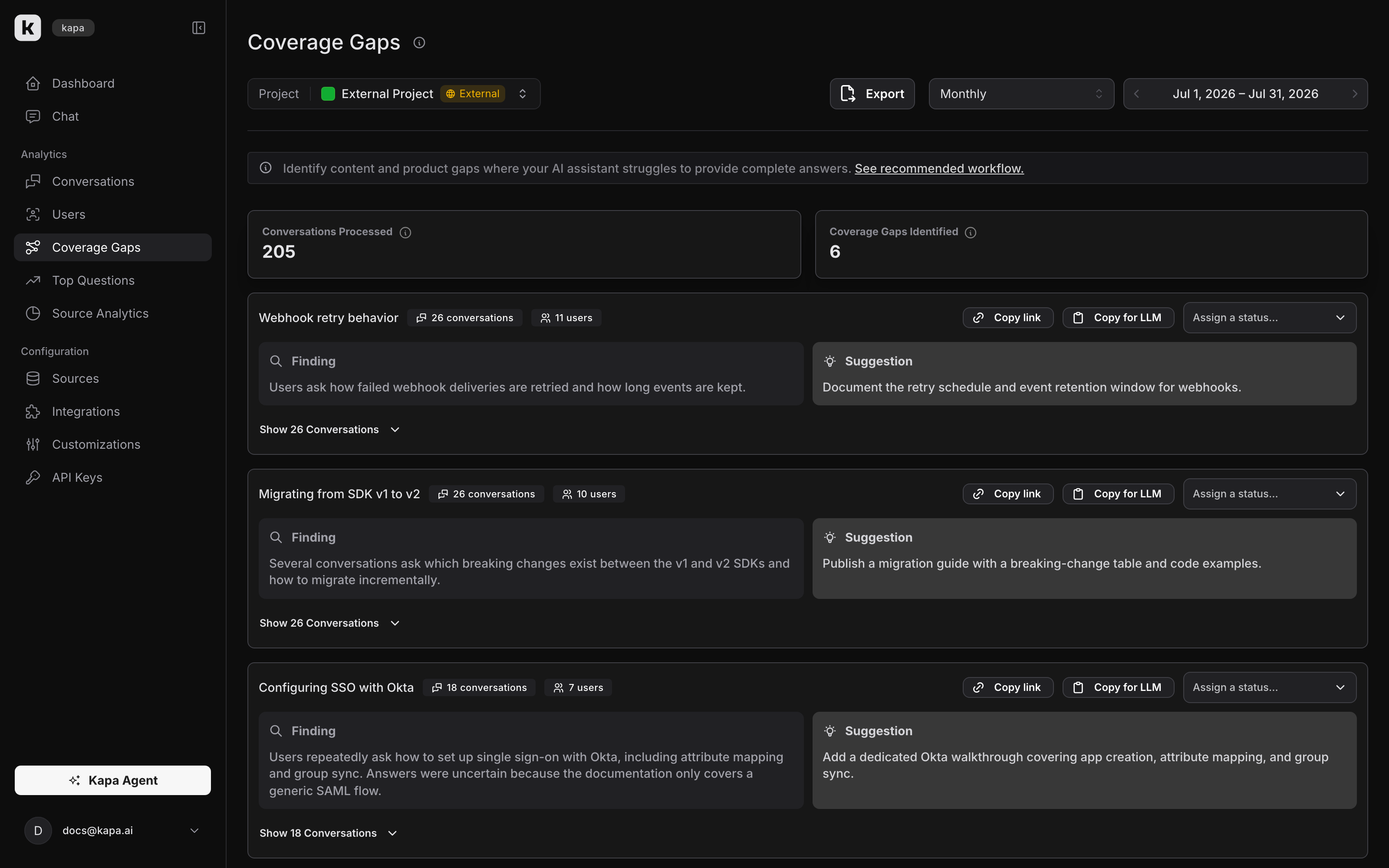
How coverage gaps work
For a selected time period (calendar week, month, or quarter), Kapa analyzes all Uncertain answers to determine common scenarios where Kapa failed to answer questions. When Kapa detects recurring topics that result in uncertain answers, it groups them into clusters and creates a summary with two parts:
- Finding: A breakdown of what users asked about and why Kapa failed to provide a complete answer
- Recommendation: AI-generated suggestions on how to address the identified gap by updating your documentation
The recommendations might suggest documenting an undocumented feature, marking a use case as unsupported, or identifying missing documentation entirely. These suggestions require human review to determine the actual problem and appropriate resolution.
Export
You can export Coverage Gaps data to a CSV file for further analysis. To export, click the Export button on the Coverage Gaps page. The exported CSV contains all clusters and their associated conversations for the selected time period.
Recommended workflow
The recommended way to act on your Coverage Gaps is to use the Analyze Coverage Gaps skill with an AI agent.
- Install the skill from the kapa-skills repository into your documentation repository
- Export your Coverage Gaps for the time period you want to analyze
- Invoke the skill with your AI agent from within your documentation repository
The skill will turn your data export into a directory of individual cluster files to track progress. You then go through each Coverage Gap one by one together with your agent. For each cluster, the agent analyzes the conversations, takes into account the recommendation from Kapa, and reviews your documentation repository to suggest whether you should address the gap and if so, how. Not every gap requires action — some topics are intentionally undocumented, some are noise, and some are outside the scope of your documentation. The exercise is about making a deliberate judgment on each one. You make the call, optionally fix the documentation on the spot, and move on to the next one. Progress is tracked so you can resume across multiple sessions.
FAQ
Why is the total count of processed conversations different from my total conversation count?
We include the first question in a conversation thread that is tagged as 'uncertain' and exclude the following:
- Threads not tagged as 'off-topic'
- Duplicate questions
What time horizons can I analyze?
Coverage Gaps are generated on a weekly, monthly, and quarterly basis. You can switch between time periods in the UI and navigate backwards and forwards to analyze how gaps change over time.
Why do I not see any clusters?
Your Kapa project needs a certain number of conversations with uncertain answers in a time period before Coverage Gaps can generate clusters. The exact number of questions depends on the questions your users ask.
How are Coverage Gaps different from the Top Questions feature?
Coverage Gaps focuses exclusively on uncertain answers to identify documentation gaps, while Top Questions analyzes all questions regardless of whether they are tagged 'uncertain' or not. This targeted approach helps you prioritize improving areas where Kapa cannot currently help users.