Build a documentation chatbot with Mastra and Kapa
In this tutorial, you build a chatbot for your documentation that answers people's questions and cites the pages it drew from. Mastra is an open-source TypeScript framework for building AI agents, Apache 2.0 licensed, and its official docs-chatbot template shows how such a chatbot fits together: an agent, plus an MCP server that gives it documentation search. The search part is a fake placeholder implementation, and the template's README tells you to swap in your own documentation.
Kapa is what you plug in there. It indexes your documentation into a searchable knowledge base and exposes it through a retrieval HTTP API, so the swap happens exactly where the template intends: the demo server's lookup tool becomes a search tool that calls the Kapa API, and everything else stays as scaffolded. Indexing, refreshes, and retrieval quality are Kapa's job, and your project keeps the template's shape.
By the end of this tutorial, you will have:
- A Mastra project, scaffolded from the docs-chatbot template, whose MCP server searches your documentation through Kapa's retrieval API.
- An agent that answers questions from your documentation and cites the source URLs it used.
- A verified conversation with the chatbot in Mastra Studio, with the tool call and its results in plain view.
If you want the same end result out of the box, you can use the prebuilt Website Widget as well.
Before you start
You need:
- Node.js 22.13 or later.
- An OpenAI API key, which the template's agent uses by default. You can swap in any model Mastra supports.
- A Kapa project with your documentation indexed. If you do not have one yet, Index your first source walks you through crawling a documentation site, with no code involved, and the knowledge sources catalog lists every other place your documentation can come from.
Scaffold the template
-
Scaffold the project from Mastra's docs-chatbot template and enter it:
npx create-mastra@latest --template docs-chatbotcd docs-chatbot -
Copy
.env.exampleto.env. You fill it in after the next section.
Tour the template
Before changing anything, look at what you scaffolded. The entire source is six files:
src/
├── mastra/
│   ├── agents/
│   │   └── docs-agent.ts    # the documentation assistant
│   ├── mcp/
│   │   └── mcp-client.ts    # the MCP client the agent gets its tools from
│   └── index.ts             # Mastra server configuration
└── mcp-server/
    ├── data/
    │   └── functions.json   # the demo "documentation"
    ├── tools/
    │   └── docs-tool.ts     # the tool that reads it
    └── server.ts            # a small MCP server exposing that tool
The two directories are the two halves of the chatbot. src/mcp-server/ is the knowledge side: server.ts is a small MCP server on port 4112, and the one tool it serves is docs-tool.ts:
export const docsTool = createTool({
  id: 'docsTool',
  description: 'Get detailed information about Kepler project functions, including arguments and helpful tips',
  inputSchema: z.object({
    functionName: z.string().optional(),
    includeRandomTip: z.boolean().optional().default(true),
  }),
  execute: async input => {
    // Looks up the answer in functions.json, some fake placeholder documentation
  },
});
src/mastra/ is the agent side, and its whole connection to the knowledge side is mcp-client.ts:
import { MCPClient } from '@mastra/mcp';

export const mcpClient = new MCPClient({
  servers: {
    // Connect to local MCP server via SSE
    localTools: {
      url: new URL(process.env.MCP_SERVER_URL || 'http://localhost:4112/sse'),
    },
  },
});
The agent in agents/docs-agent.ts hands whatever that client finds straight to the model:
export const docsAgent = new Agent({
  // ...instructions and identity, rewritten later in this tutorial
  model: 'openai/gpt-5-mini',
  tools: await mcpClient.listTools(),
  memory: new Memory(),
});
This architecture is already the finished shape of the build. The agent does not care what its knowledge tools do internally; it consumes whatever the MCP client connects to. All that is left to do is rewrite the demo server's tool to search your real knowledge base instead of the Kepler file.
Get your Kapa credentials
The search tool you build in the next section needs three values from the Kapa platform, and the agent needs one more:
- Project ID: the unique identifier of your Kapa project. Go to Settings > Projects and copy it from the table.
- Integration ID: navigate to Integrations (under Deploy in the sidebar), click Add new integration, choose HTTP API, and copy the new integration's ID. The Retrieval endpoint works without one, but passing it marks the queries as this chatbot's traffic, so you can tell it apart from everything else that queries your project.
- API key: navigate to API Keys (under Deploy in the sidebar), click Add new API key, and copy the key.
- OpenAI API key: the key the template's agent uses for its model, created in the OpenAI dashboard.
Add all four to .env:
KAPA_PROJECT_ID=<your project ID>
KAPA_INTEGRATION_ID=<your integration ID>
KAPA_API_KEY=<your API key>
OPENAI_API_KEY=<your OpenAI API key>
Rewrite the tool to search your knowledge base
The whole integration is one file: rewrite docs-tool.ts so that instead of looking up Kepler functions, it calls Kapa's Retrieval API. Replace the file's contents with:
import { createTool } from '@mastra/core/tools';
import { z } from 'zod';

type RetrievalResult = {
  source_url: string;
  content: string;
};

export const docsTool = createTool({
  id: 'docsTool',
  description:
    'Perform semantic retrieval over the documentation and other knowledge ' +
    'sources of the product and return the most relevant chunks for a given ' +
    'query. A "chunk" is a short, self-contained snippet of text taken from ' +
    'a single page or item within these sources and includes its source URL ' +
    'and markdown content. The number of chunks varies with the query: the ' +
    'tool returns the chunks it judged relevant. If the ' +
    'knowledge sources do not contain information relevant to the query, ' +
    'the returned chunks may be only weakly related or entirely unrelated. ' +
    'Use this tool anytime you need ' +
    'information about the product.',
  inputSchema: z.object({
    query: z.string().describe(
      'A single, well-formed natural-language query. Must be a complete sentence.',
    ),
  }),

  execute: async ({ query }) => {
    const url = `https://api.kapa.ai/query/v1/projects/${process.env.KAPA_PROJECT_ID}/retrieval/`;

    const response = await fetch(url, {
      method: 'POST',
      headers: {
        'X-API-KEY': process.env.KAPA_API_KEY!,
        'Content-Type': 'application/json',
      },
      body: JSON.stringify({
        query,
        integration_id: process.env.KAPA_INTEGRATION_ID,
        mode: 'deep',
      }),
    });

    if (!response.ok) {
      throw new Error(`Kapa retrieval request failed with status ${response.status}`);
    }

    return (await response.json()) as RetrievalResult[];
  },
});
The tool keeps its docsTool export, so the MCP server in src/mcp-server/server.ts registers it without any change, and the agent picks it up through the MCP client exactly as before. What changes is what the tool does. The agent sends a natural-language query, the tool forwards it to your project's Retrieval endpoint, and the response is a list of the most relevant passages from your indexed documentation, each one's content paired with the source_url of the page it came from. That array goes back to the agent verbatim. mode: 'deep' selects Kapa's most capable retrieval mode, in terms of both recall and precision: a retriever agent searches and reads your documentation and returns what it judges relevant, which keeps the number of tokens Kapa contributes to your agent's context small. Choose a retrieval mode covers the modes and their latency. The tool and parameter descriptions are adapted from the ones Kapa's own hosted MCP servers publish for their search tool: they tell the model what a chunk is and when to reach for the tool. The Kepler data file under data/ is now unused; delete it or leave it, nothing reads it anymore.
Kapa can also host the MCP server for you: point the template's MCPClient at the hosted server's URL and src/mcp-server/ can be deleted entirely.
Rewrite the agent's instructions
The template's agent in src/mastra/agents/docs-agent.ts is instructed as a Kepler expert. Replace its identity fields and instructions so it answers from your knowledge base and cites what it found:
import { Agent } from '@mastra/core/agent';
import { Memory } from '@mastra/memory';
import { mcpClient } from '../mcp/mcp-client';

export const docsAgent = new Agent({
  id: 'docs-agent',
  name: 'Docs Agent',
  description: 'Answers product questions from the knowledge base indexed by Kapa',
  instructions: `You are a helpful assistant that answers questions about the product covered by the connected knowledge base.

When users ask questions:
1. Always search the knowledge base first, even when you think you know the answer.
2. Base your answer only on what the search returns; if nothing relevant comes back, say you do not know.
3. End every answer with the source URLs of the search results you used, as a list of links.
4. Keep answers practical: prefer exact steps and working examples over background theory.`,
  model: 'openai/gpt-5-mini',
  tools: await mcpClient.listTools(),
  memory: new Memory(),
});
Two lines carry the integration:
tools: await mcpClient.listTools()is unchanged from the template, and it is why the swap needs no further wiring: the agent takes whatever tools the MCP client finds, so your knowledge search tool arrives the moment the client connects.- Instruction 3 turns search results into citations. Every passage the search tool returns carries the source URL of the page it came from, so the agent only has to repeat what it received. Answers that link back to your documentation let users verify claims and read further, and they are the fastest way to spot when the agent answers from the wrong page.
The instructions deliberately name no product: they refer to "the connected knowledge base", so the file works unedited. Naming your product and describing your users makes the agent better at its job; Prompt for grounded answers covers what belongs in the instructions of a grounded agent.
Verify it works
Mastra Studio, the playground built into Mastra's development server, is where you confirm the chatbot works: a browser interface where you chat with your agents, switch models, and inspect every step of a run, including each tool call's arguments and results.
-
Start the two halves, each in its own terminal. First the MCP server with your new search tool:
npm run dev:mcpThen, in a second terminal, the Mastra server and Studio:
npm run dev:mastra -
Open Mastra Studio at http://localhost:4111, select Docs Agent, and ask a question your documentation answers.
-
Watch the agent work: the chat shows the call to the search tool, listed as
localTools_docsToolbecause the MCP client prefixes each tool with the name of the server it came from. Expanding the call shows the query the agent formulated, the passages that came back with their source URLs, and the answer composed from them ends with the source links, as instructed.
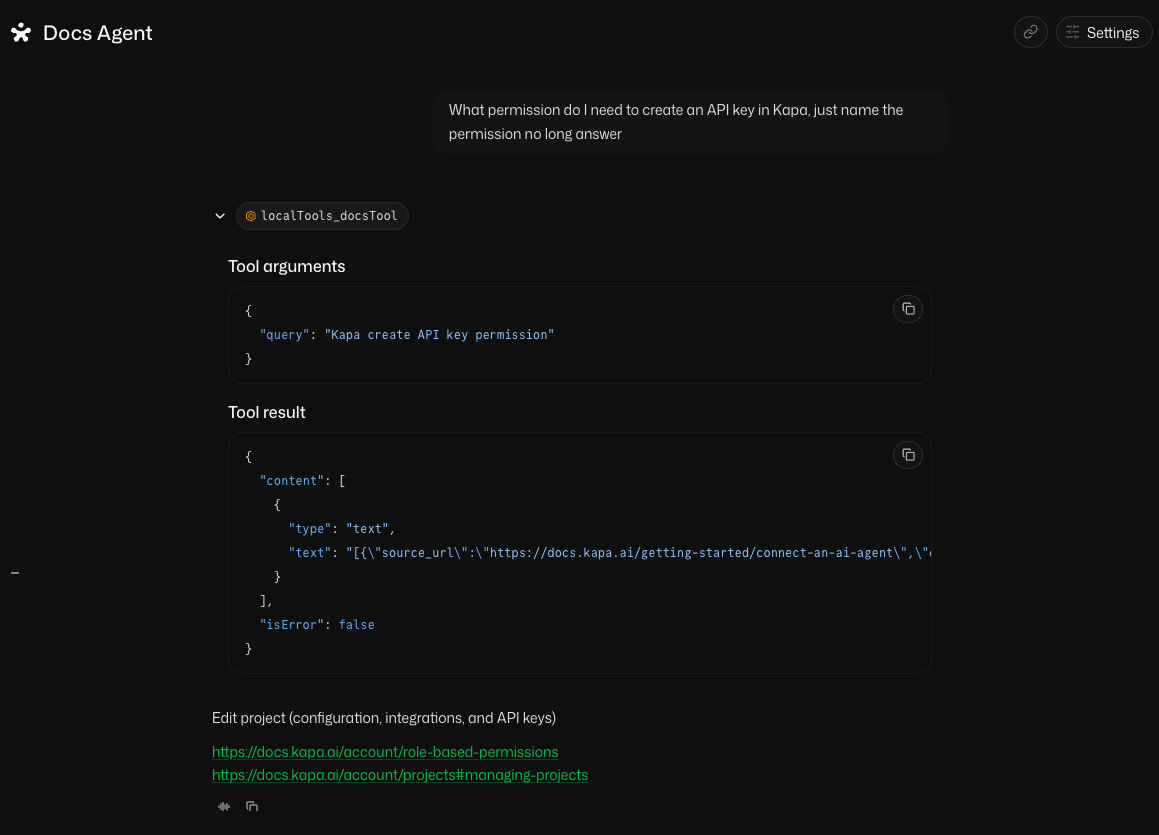
This screenshot comes from an example project that indexes Kapa's own documentation, which is why the question and the cited pages are about Kapa. Your chatbot answers from whatever documentation your project indexes.
Summary
In this tutorial, you:
- Scaffolded Mastra's docs-chatbot template and saw that its architecture, an agent consuming knowledge tools over MCP, is already the finished shape of a documentation chatbot.
- Rewrote the demo server's lookup tool into a search tool over your indexed documentation, backed by Kapa's retrieval API, without touching the rest of the template.
- Instructed the agent to ground every answer in search results and cite its sources, and confirmed it in Mastra Studio.
Next steps
- Knowledge sources: the chatbot does not have to stop at documentation. The same knowledge base can index your GitHub issues, code repositories, support tickets, and community threads, and the agent searches all of it through the same tool.
- Build a front end: Studio is for development; Mastra's guides show how to put a real chat interface in front of this agent with AI SDK UI, CopilotKit, or Assistant UI.
- Hosted MCP server: let Kapa run the server side too. Point the template's
MCPClientat a hosted MCP server and the local server directory becomes deletable. - Choose a retrieval mode: which mode to run, default or deep, and how much to let it return.