Conversation handoff
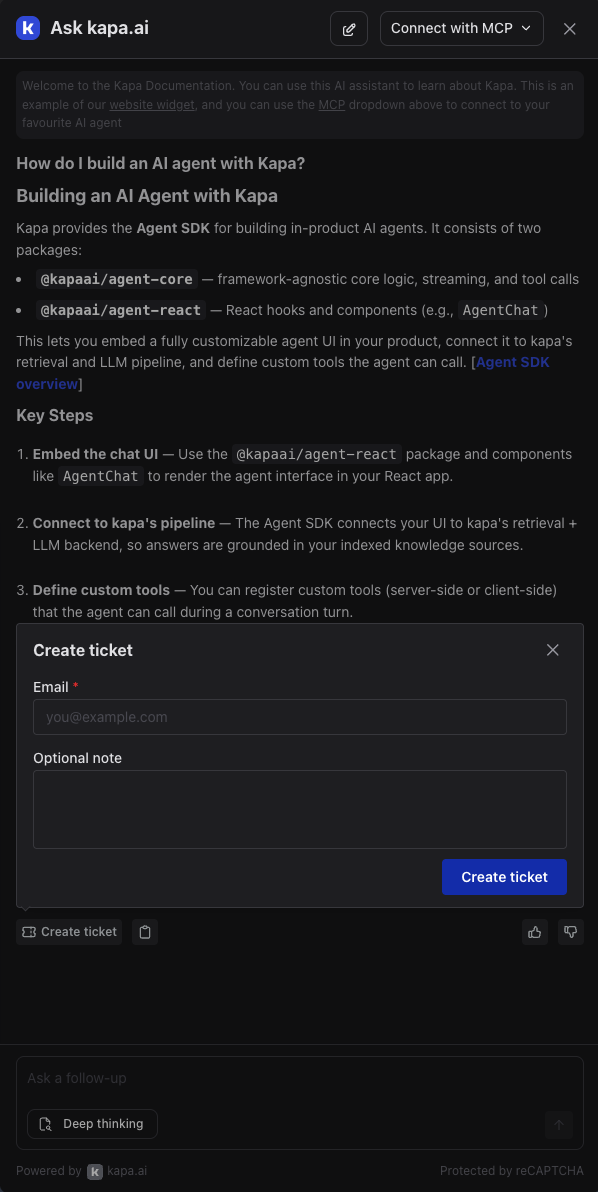
The Kapa Website Widget can offer users a Create ticket button on answers. It hands the conversation from the AI to a human workflow while keeping the full context of what the user asked. The button is not shown until you configure it. You can have Kapa email the conversation to an address you set, for example your support inbox or your ticketing tool's email intake, or hand off through code: the button passes the conversation to a JavaScript callback you register, for example to open and prefill a ticketing widget that is already on the page.
Common use cases
- Support escalation: the user needs a human when the AI answer does not fully resolve their question.
- Sales or demo requests: the user is qualifying and wants to talk to a person.
- Bug reports: the user hit an issue and wants to send the context to your engineering team.
- Existing ticketing widget: you run Pylon, Zendesk, Intercom or similar on the page and want the conversation to open directly in that widget rather than arrive by email.
Handoff modes
Choose what the button does with data-handoff-mode. Handoff is off until you set a mode or configure data-handoff-email on its own.
data-handoff-mode | What happens on click | Also needs |
|---|---|---|
email | Kapa opens a small form asking for the user's email and an optional note, then emails the transcript and note to your address. | data-handoff-email="..." |
custom | Kapa shows no UI. The click fires onAskAIHandoffOpen and your handler takes over. | An onAskAIHandoffOpen handler |
custom-with-form | Kapa opens its email-and-note form. On submit, your onAskAIHandoffSubmit handler performs the action instead of Kapa sending an email. | An onAskAIHandoffSubmit handler |
Setting data-handoff-email on its own also enables email mode. If both attributes are present, data-handoff-mode decides.
Triggers and button styling apply to every mode.
Email handoff
Set the mode to email and data-handoff-email to the address that should receive tickets:
<script
  src="https://widget.kapa.ai/kapa-widget.bundle.js"
  data-website-id="YOUR-WEBSITE-ID"
  data-handoff-mode="email"
  data-handoff-email="handoff@example.com"
></script>
data-handoff-mode="email" can be left out when data-handoff-email is set; the email alone enables this mode.
Clicking the button opens a form that asks for the user's email and an optional note. On submit, an email containing the full question-and-answer transcript plus the note is sent to the address you configured. The email's Reply-To is set to the user's email, so the recipient can respond to the user directly.
Handing off through code
Both custom modes pass your callback a markdown transcript of the conversation, together with the thread ID, the conversation as structured data, and the triggers that made the button appear. What you do with it is up to you.
custom: no Kapa form
Use this when you want to collect the user's details through something other than Kapa's form, for example by opening your own form or a ticketing widget that is already on the page. Kapa shows no UI of its own. As soon as the user clicks the button, onAskAIHandoffOpen fires with the conversation and transcript, and your handler takes it from there. A typical handler closes the Kapa modal and opens the other tool with the transcript prefilled:
<script
  src="https://widget.kapa.ai/kapa-widget.bundle.js"
  data-website-id="YOUR-WEBSITE-ID"
  data-handoff-mode="custom"
></script>
<script>
  window.Kapa("onAskAIHandoffOpen", function ({ transcript }) {
    // 1. Close the Kapa widget so the ticketing widget is visible.
    window.Kapa("close");

    // 2. Prefill the ticketing widget's form with the conversation.
    //    Replace with your tool's own API.
    myTicketingWidget.prefillForm({ message: transcript });

    // 3. Open the ticketing widget for the user to finish the ticket.
    myTicketingWidget.open();
  });
</script>
Kapa does not close its own modal in this mode. Calling window.Kapa("close") in your handler, as above, gets it out of the way.
custom-with-form: Kapa's form, your submit
Use this when you want to collect the user's email and a note but create the ticket yourself, for example through your own API. Kapa shows its form and, on submit, fires onAskAIHandoffSubmit with userEmail and note added to the payload. No email is sent.
Return a promise from your handler. The form shows a loading state until it settles, then the success screen when it resolves or an error message with the form still filled in when it rejects, so the user can try again.
<script
  src="https://widget.kapa.ai/kapa-widget.bundle.js"
  data-website-id="YOUR-WEBSITE-ID"
  data-handoff-mode="custom-with-form"
></script>
<script>
  window.Kapa("onAskAIHandoffSubmit", async function (payload) {
    const response = await fetch("/api/tickets", {
      method: "POST",
      headers: { "Content-Type": "application/json" },
      body: JSON.stringify({
        email: payload.userEmail,
        note: payload.note,
        transcript: payload.transcript,
        threadId: payload.threadId,
      }),
    });
    if (!response.ok) {
      throw new Error("Ticket API returned " + response.status);
    }
  });
</script>
If no handler is registered
In custom-with-form, submitting the form with no onAskAIHandoffSubmit handler registered shows the user a message that ticket creation is not available instead of a success screen, and logs an error to the browser console naming the missing handler. In custom, a click with no onAskAIHandoffOpen handler does nothing visible and logs the same kind of console error. Register your handler with the preinitialization snippet in place so the call is queued until the widget has loaded, regardless of script order.
The transcript
The transcript is a markdown rendering of the whole conversation: each question and answer in order, with the sources cited under each answer and the user's thumbs up or down where given.
Renaming the button
The button label defaults to Create ticket. Override it with data-handoff-button-text to match your workflow:
data-handoff-button-text="Talk to Sales"
See Handoff button for the full list of button styling options.
Configuring triggers
By default the button shows on every answer. You can restrict it to answers that meet specific conditions using data-handoff-triggers:
data-handoff-triggers="uncertainty,downvote"
Supply a comma-separated list. The button appears when any listed trigger matches.
| Trigger | Shows the button when… |
|---|---|
always | Every answer. This is the default. |
conversation-length | The conversation has reached at least data-handoff-conversation-length-threshold question-answer pairs. |
uncertainty | Kapa flagged the answer as uncertain. |
downvote | The user has downvoted the answer. |
Conversation-length threshold
When you use the conversation-length trigger, control the pair count with data-handoff-conversation-length-threshold (default 3):
data-handoff-triggers="conversation-length"
data-handoff-conversation-length-threshold="5"
Event tracking
Track handoff interactions with the following events:
onAskAIHandoffOpen- User pressed the button. Incustommode this is the handoff itself.onAskAIHandoffSubmit- User submitted Kapa's form. Incustom-with-formmode this is the handoff itself.onAskAIHandoffCancel- User closed the form without submitting.
See the Events API documentation for implementation details.