Style the widget as a sidebar
You can configure the Website Widget to appear as a persistent sidebar on the right side of your page, taking up the full height and a fixed width. This is ideal for documentation or support sites where you want the AI assistant to always be visible and accessible.
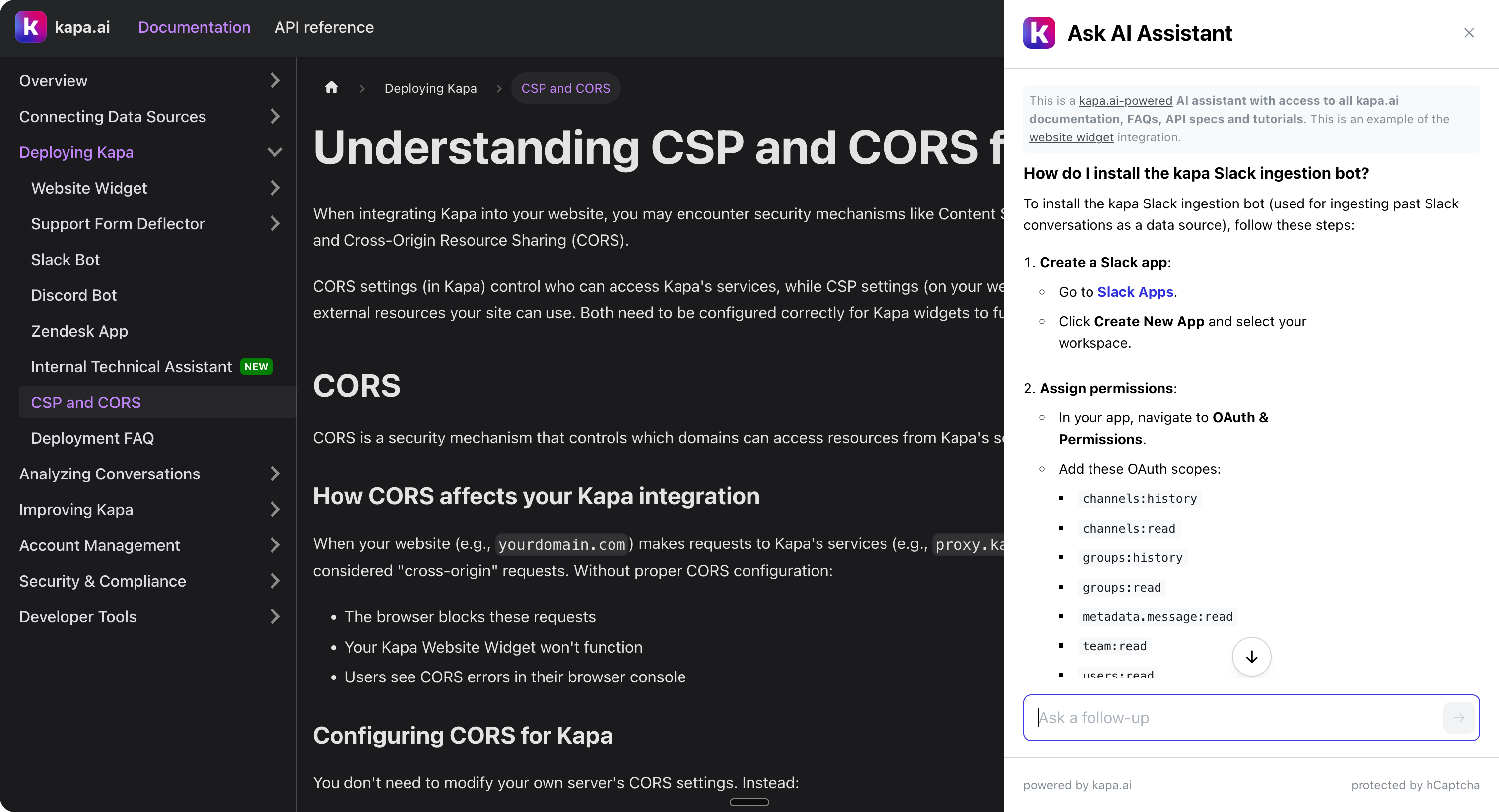
Configuration
To enable the sidebar layout, set data-view-mode="sidebar" on your script tag. This applies a built-in preset that configures the modal as a right-aligned sidebar:
<script
  async
  src="https://widget.kapa.ai/kapa-widget.bundle.js"
  data-website-id="XXX-XXX-XXX"
  data-project-name="kapa.ai"
  data-project-color="#6306B6"
  data-project-logo="kapa.ai/assets/logo.png"
  data-view-mode="sidebar"
  data-chat-disclaimer="This is a custom LLM with access to all [Kapa documentation](https://docs.kapa.ai)."
  data-example-questions="How do I get started?,How to add example questions?"
  data-user-analytics-fingerprint-enabled="true"
></script>
The sidebar view mode automatically configures the modal size, positioning, overlay, scroll behavior, and border radius. See View modes for the full list of defaults applied.
Customizing the sidebar layout
You can override any of the preset defaults by setting individual component style attributes alongside data-view-mode="sidebar". For example, to change the sidebar width:
<script
  ...
  data-view-mode="sidebar"
  data-modal-size="600px"
></script>
The sidebar position and spacing are controlled by the modal-inner component's style properties. You can adjust these to fine-tune the sidebar's placement on the page:
<script
  ...
  data-view-mode="sidebar"
  data-modal-inner-right="16px"
  data-modal-inner-top="16px"
  data-modal-inner-bottom="16px"
></script>
This adds 16px of spacing around the sidebar, pulling it away from the viewport edges. You can also reposition the sidebar to the left side of the page:
<script
  ...
  data-view-mode="sidebar"
  data-modal-transition="slide-right"
  data-modal-inner-justify-content="flex-start"
  data-modal-inner-left="16px"
  data-modal-inner-right="auto"
></script>
FAQ
Q: How do I make sure the widget appears above other elements?
A: You can set the z-index of the widget using the data-modal-z-index parameter:
<script ... data-modal-z-index="2000"></script>
This is optional and only needed if you have other elements with high z-index values on your site.