Best practices for building an in-product agent
An in-product agent is an AI assistant embedded directly in your application that combines two capabilities: access to your knowledge base and custom tools that connect to your product's data and APIs. Unlike a simple chatbot that only answers questions from documentation, an in-product agent can also execute actions, query live data, and reason through multi-step tasks on behalf of your users.
This guide shares what we learned building our own analytics agent with the Kapa Agent SDK. We will walk through the agent we built, then cover the practical best practices that made the biggest difference in quality. Whether you are planning your first agent or refining an existing one, these lessons should help you avoid common pitfalls.
The Kapa Agent SDK
The Kapa Agent SDK is a toolkit for embedding an in-product agent into your application. It is available as a core TypeScript library that works in any environment, and a React package that provides a full chat UI with theming out of the box.
The SDK is built around the idea that an effective in-product agent needs two things: knowledge base access and custom tools. Knowledge base search is built in and runs server-side, so the agent can answer product questions from your documentation without any extra setup. On top of that, you layer your own tools that describe what the agent can do with your product. Each tool has a schema and a function that runs when the agent calls it. The SDK handles the conversation loop, streaming responses, and multi-turn tool execution.
Tools run on the client side, which means they can use your existing APIs and authentication directly. You can also attach custom UI to any tool, so instead of showing raw JSON the agent can display charts, cards, or whatever fits your product. See the Agent SDK documentation for the full setup guide.
What we built
We built an analytics agent inside the Kapa dashboard. It lives as a slide-in panel that users can open from any page.
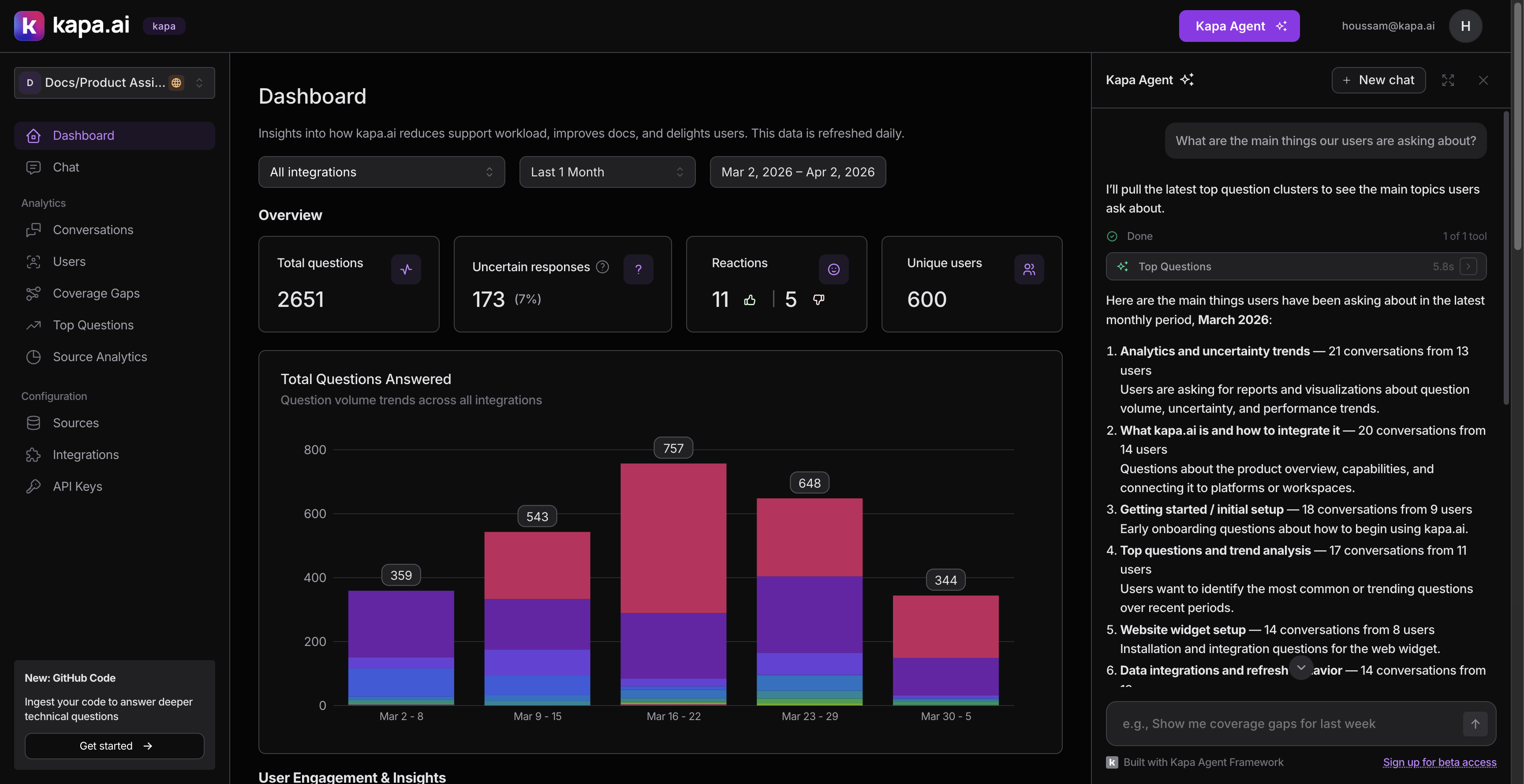
The agent helps users analyze their AI assistant's performance by connecting to the same data available in the dashboard: conversations, topic clusters, analytics, user activity, and more. Instead of clicking through filters and pages, users ask questions like:
- "What are the top questions from our Docs widget this month?"
- "How many pricing questions did we get in Q1?"
- "Show me the coverage gaps and help me prioritize which ones to address."
The agent has around 30 tools across several categories:
- Discovery: listing integrations, end users, tags, and API keys (used to resolve names to IDs for filtering)
- Analytics: performance summaries with time series data
- Conversations: search, count, and drill into individual threads
- Topic clusters: top questions and coverage gaps by time period
- Visualization: inline charts (bar, line, area, donut)
- Actions: tagging, creating/deleting resources, adding comments (all require user approval)
- Navigation: deep-linking to filtered dashboard views (requires approval)
The rest of this article covers the best practices we discovered while building and iterating on this agent.
Best practices
Design tools around user questions, not API endpoints
When we started, the temptation was to expose every API endpoint as a tool. We resisted. Instead, we started from the questions our customers were actually asking and worked backward to figure out what tools we would need.
We identified seven patterns from real customer requests:
| Pattern | Example | What we built |
|---|---|---|
| Filter by channel | "Stats only from our Docs widget" | Integration-aware filtering on every tool |
| Count without full data | "How many pricing questions this month?" | A dedicated count_conversations tool |
| Topic analysis over time | "Top 10 questions each quarter" | Cluster tools with date-based lookups |
| Slice by dimensions | "Questions asked in Chinese" | Language, confidence, intent filters |
| User-level analysis | "Common theme for this user?" | End user lookup + conversation filtering |
| Actionable insights | "Help me address the top 5 gaps" | Coverage gap tools + status tagging |
| Visual output | "Graph of uncertain responses over time" | Inline chart rendering |
Starting from user needs rather than API surface meant we built tools that compose well together, rather than a grab-bag of endpoints.
Include discovery tools that return IDs
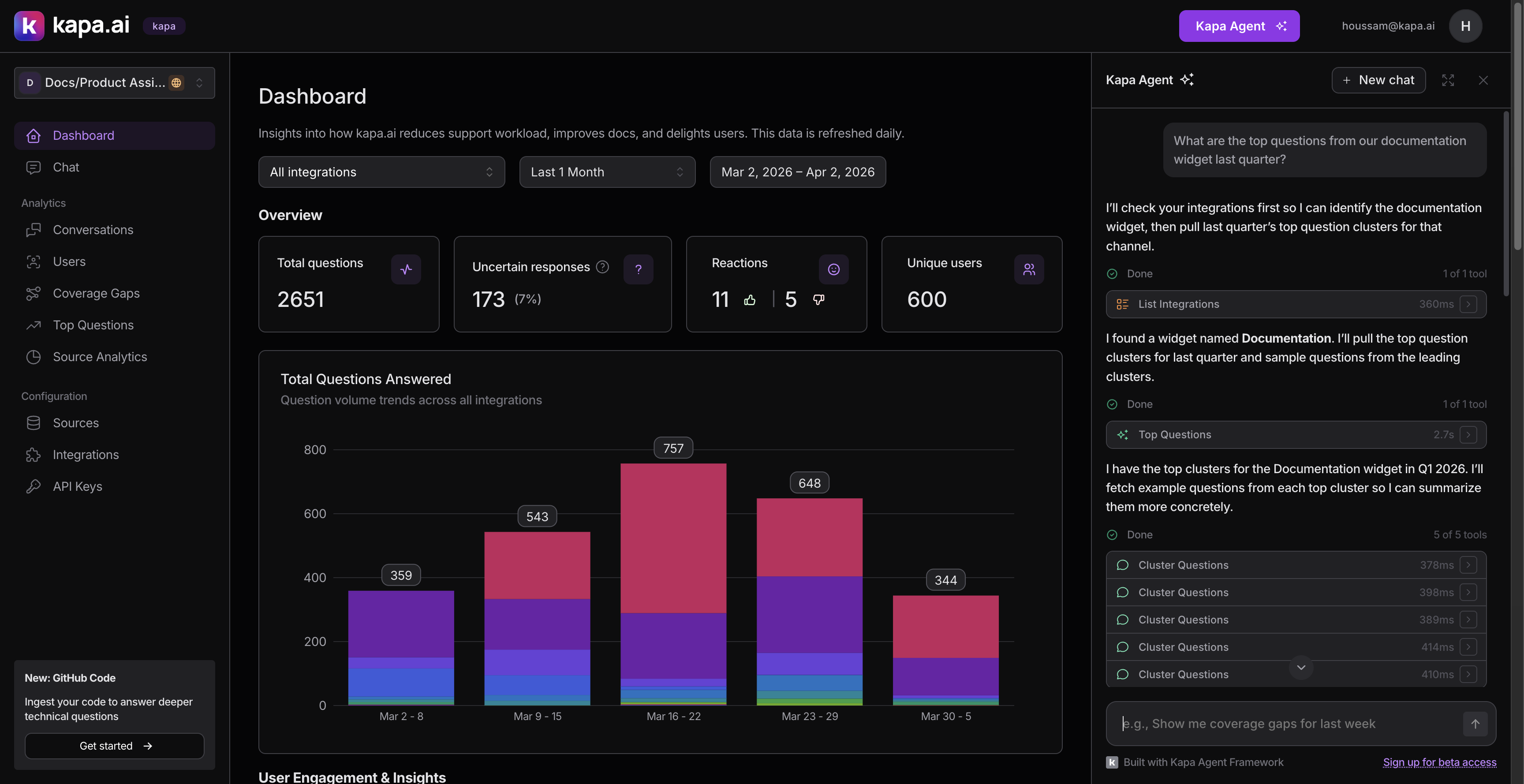
The most important tools we built are not the flashy analytics ones. They are the boring "list" tools: list_integrations, list_custom_tags, list_end_users, list_status_tags.
These return items with their names and IDs. The agent uses them to resolve human-readable names ("our Docs widget") to UUIDs that other tools accept as filter parameters. Without them, every filtering workflow breaks down.
The pattern looks like this in practice:
- User asks: "What are the top questions from our Public Docs widget?"
- Agent calls
list_integrations→ finds "Public Docs" has IDabc-123 - Agent calls
list_top_questionswithintegration_id: "abc-123" - Agent presents the results
This "list → resolve ID → filter" pattern repeats constantly. We made sure every list tool returns both the human name and the UUID, so the agent can make the connection.
Require approval for anything that modifies data
We split tools into two clear categories:
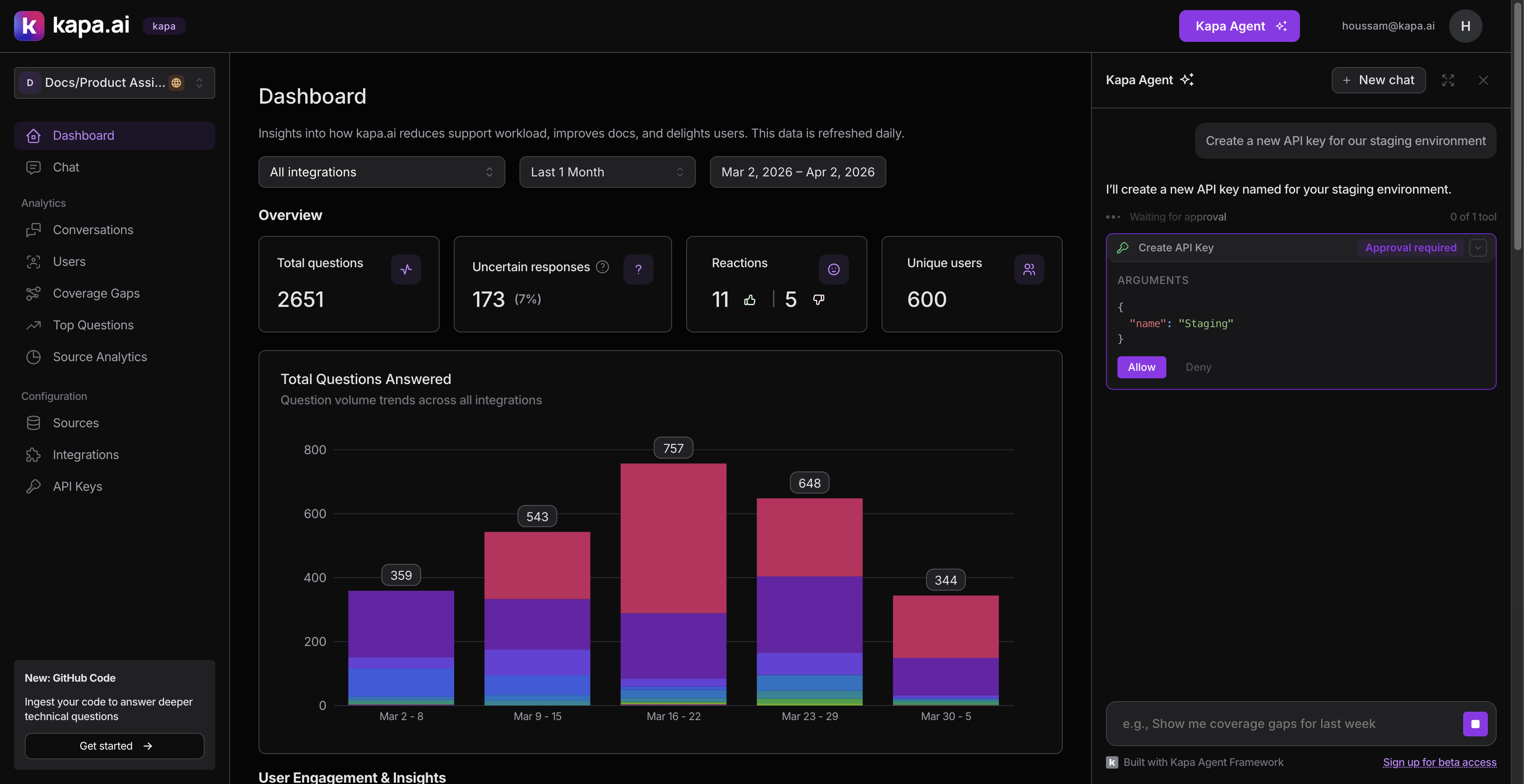
Read-only tools (discovery, analytics, search, counting) execute immediately without asking the user.
Write tools (tagging conversations, creating or deleting integrations, managing API keys, adding comments) all require explicit user approval before executing. We set needsApproval: true on each of these.
This distinction is simple but important. An agent that silently deletes an API key or creates an integration would erode trust fast. The approval flow shows the user exactly what the agent wants to do and its arguments, and waits for an explicit Allow or Deny.
We also put navigation behind approval. The agent can deep-link to filtered conversation views, specific threads, or topic cluster pages, but it asks first. Unexpectedly redirecting someone is jarring.
Ship fewer tools, not more
We deliberately excluded our source analytics endpoint from v1. It shows which documentation pages get cited most in answers, which is useful data, but the endpoint takes several seconds to respond. An agent tool that hangs for 5+ seconds mid-conversation makes the whole experience feel broken.
A focused set of fast, reliable tools beats a comprehensive but inconsistent one. We can always add more tools later once we optimize the slower endpoints. Shipping with ~30 tools was probably already too many. In hindsight, starting with 15 and expanding based on usage data would have led to better LLM reliability.
Adapt your APIs for agent consumption
This was the most time-consuming part of the project, and the biggest lesson: your existing APIs are probably not agent-ready.
APIs designed for paginated UIs (cursor-based navigation, one page at a time, fixed sort orders) do not map well to how an agent needs to access data. Here are the specific problems we hit and how we solved them.
The "latest only" problem. Our topic clustering endpoints originally only returned the most recent period, with a pagination cursor to page through clusters. If a user asked "What were the top questions in September?", the agent had no way to get there. We built a new by-date endpoint that accepts a specific date and interval (weekly, monthly, quarterly), so the agent can look up any period directly.
Oversized responses. Our cluster endpoints were returning full nested objects with all threads and metadata. We added an include_threads=false parameter that returns just summaries with a thread_count field. The agent uses this lightweight mode for overviews, then calls a separate tool to drill into a specific cluster.
Counting without fetching. A surprising number of user questions are just "how many." We built a count_conversations tool that hits the same search endpoint but with page_size=1, returning just the count without any conversation data.
Pagination support. For search_conversations, we extract the cursor from the paginated response and return it as a next_cursor field. The tool's schema describes this so the LLM can page through results incrementally.
Keep tool responses small
Token efficiency directly affects agent quality. When tool responses are too large, the LLM's context window fills up, it loses track of earlier information, and response quality drops.
- Small default page sizes: Tool descriptions suggest small
page_sizevalues (e.g., 20) so the LLM does not request thousands of results - Summary modes:
include_threads=falseon cluster endpoints returns counts instead of nested arrays - Selective field mapping: Some tools transform the API response before returning it, stripping fields the agent does not need and flattening nested structures
- Dedicated counting tool: Instead of searching conversations and counting the results,
count_conversationsreturns just a number - Cursor-based pagination: Rather than returning all results at once, the agent can page through incrementally
The general principle: return the minimum information the agent needs to answer the question, and give it a way to drill deeper if needed.
Invest heavily in custom instructions
If there is one thing we would tell anyone building an agent, it is this: custom instructions are the single biggest quality lever, more impactful than adding tools, optimizing response sizes, or tuning anything else.
The Agent SDK's customInstructions prop lets you inject text into the system prompt. We use it to teach the agent our domain and guide how it uses tools. Our instructions block covers three areas.
Domain context. We define every concept the agent needs to understand in plain language: what "uncertain" vs "certain" means (AI confidence, not factual correctness), what coverage gaps are (documentation holes), how integrations, end users, and tags work. Without this, the agent misuses terms and gives misleading explanations.
Tool strategy. We describe how to combine tools for common scenarios:
- "Before filtering by integration, call
list_integrationsfirst to resolve the name to a UUID." - "When the user asks about a topic, start by calling
list_custom_tagsto check if a relevant tag exists." Tag-based filtering is more precise than text search. - "The
dateparameter must be the first day of the period: for monthly pass the 1st, for quarterly pass the quarter start." - "Use
search_textwith short keywords, NOT full sentences." Our search uses PostgreSQL websearch syntax.
Preventing bad patterns. We also tell the agent what not to do:
- "After rendering a chart, do NOT list the same numbers in text." Without this, the agent renders a chart and then writes out every data point in a paragraph.
- "When
count_conversationsreturnscapped=true, always report as 'more than 2,000'. Never state the raw number as exact."
Our custom instructions block is roughly 80 lines. Every line is there because we observed the agent doing the wrong thing without it. Think of it as the instruction manual you would write for a new team member who has access to all your internal tools but does not know your product.
Keep tool schemas simple for visualization
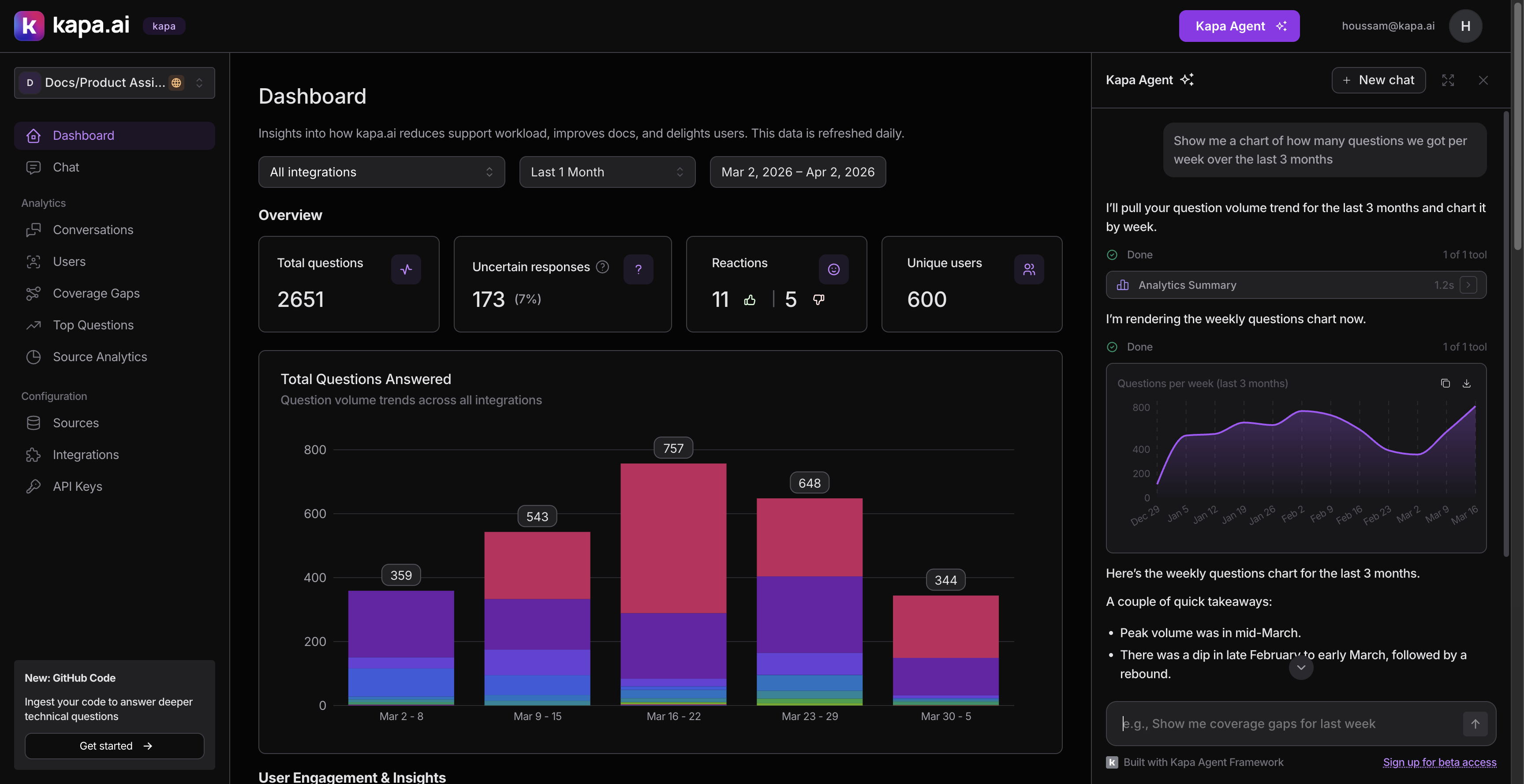
We wanted the agent to show charts inline when users asked for visual data.
Our first attempt was a render_chart tool with a complex schema that included chart configuration, axis labels, color schemes, and nested data series. It failed. The LLM inconsistently filled the schema. It would provide the configuration but omit the data array, or vice versa.
We scrapped it and built display_chart with the simplest possible schema: a title, a type (bar, line, area, donut), and a data array of { label, value } pairs. That is it. The LLM fills this reliably every time.
The lesson: simpler tool schemas produce more reliable LLM behavior. If you find the LLM struggling with a tool, simplify the schema before adding more instructions.
Use the event callback for observability
Once the agent was running, we needed to understand how people were using it. The Agent SDK's onEvent callback fires typed events at key moments:
- Message sent: how often and how long user messages are
- Response completed/errored/stopped: success rate and whether users interrupt the agent
- Tool executed: which tools get called, success rate, and duration
- Tool approved/denied: how often users accept vs reject write operations
- Conversation reset: how frequently users start over
The tool execution events with duration were particularly useful. They showed us which tools were slow (motivating the lightweight response modes), which tools the agent called most (validating our tool priorities), and which tool combinations appeared together (informing our custom instructions).
Summary
Building an in-product agent is less about the AI and more about the data access layer, the tool design, and the instructions that guide the agent's behavior. The LLM is capable. Your job is to give it the right tools, the right context, and the right guardrails.
The practices that made the biggest difference for us:
- Design tools around user questions, not API endpoints
- Include discovery tools that return IDs for cross-referencing
- Require approval for anything destructive
- Adapt your APIs for agent consumption (date lookups, lightweight modes, counting)
- Keep tool responses small
- Invest heavily in custom instructions
- Keep tool schemas simple
- Use event callbacks for observability
If you are ready to get started, check out the Agent SDK documentation and the example applications.