Hosted MCP server
Deploy a hosted MCP server for your Kapa project in a single click. Your users can then connect tools like Cursor, Claude Code, VS Code, Windsurf, and ChatGPT directly to your knowledge sources. This means:
- More accurate AI responses: Agents have up-to-date context about your product, APIs, and dependencies.
- Better developer experience: Users can query your docs without leaving their editor.
You can connect directly to Kapa's own MCP here. Use it to ground AI responses in the latest Kapa documentation when implementing Kapa in your product.
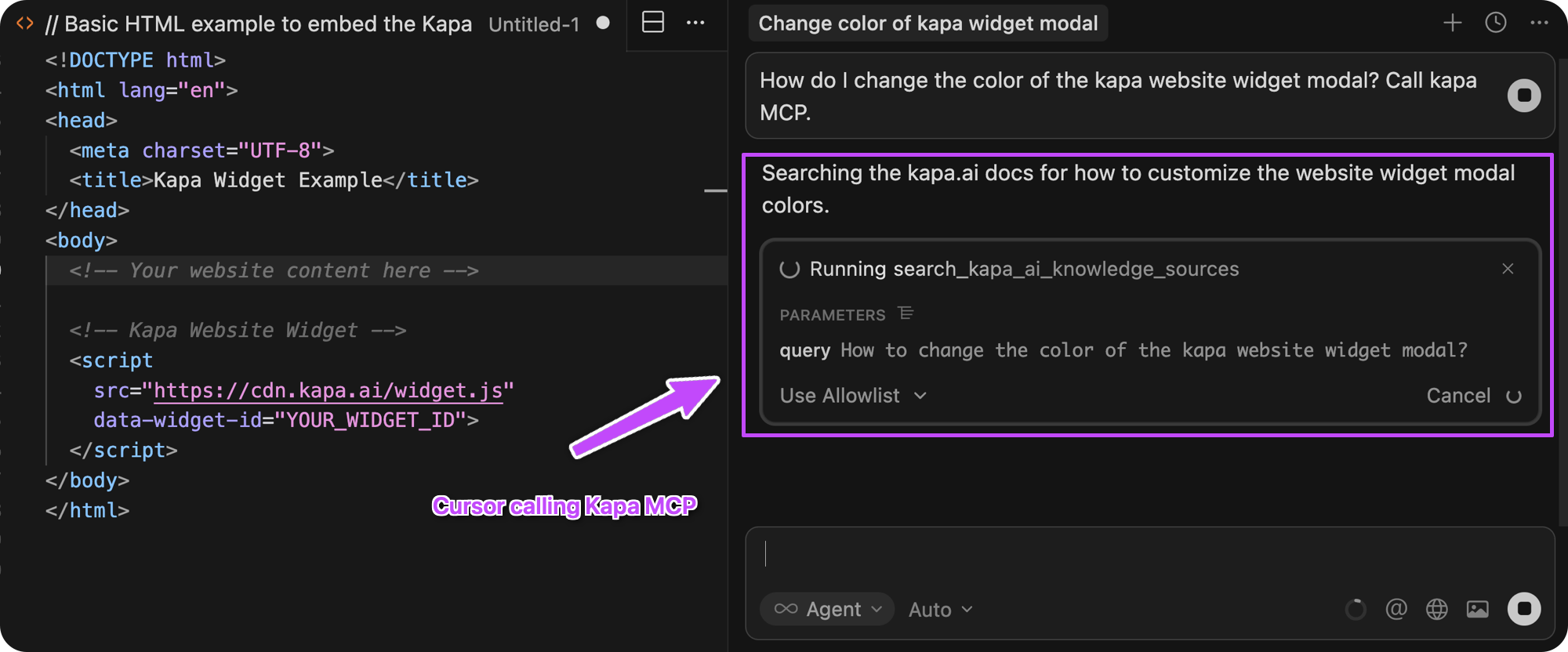 Cursor querying Kapa's MCP to answer a question about a kapa widget configuration.
Setup and configuration
To set up an MCP server for your Kapa instance:
- In Kapa, click Integrations > + Add new integration.
- Choose Hosted MCP Server.
- Click Continue.
- Configure the Subdomain: This becomes the first part of the URL clients use to connect to your MCP server, in the form
<subdomain>.mcp.kapa.ai. - Configure the Server name. This becomes the MCP server label (server_name / serverLabel) that clients see when listing or calling tools from this server; it does not affect the URL or subdomain.
There are two other elements that can be configured:
- Server instructions
- The semantic retrieval tool name and description: the description helps the LLM know what your tool is for and when to use it.
Kapa provides a default configuration for these elements. This should be suitable for most use cases. If you need to change them, contact support@kapa.ai.
Share the MCP with your users
If you already have a Website Widget live, you should advertise your MCP server via the MCP install menu in the widget header.
To enable it, follow the steps in Website Widget | Configuration → MCP install menu, which covers all required widget attributes, examples, and behavior.
You should also add a dedicated page to your documentation with setup instructions for popular AI tools. See the page describing the Kapa MCP server for an example.
Share your MCP on social media, in developer newsletters, or alongside other help resources in your docs.
Authentication
When a user connects to your public hosted MCP server for the first time, Kapa opens a Google sign-in window and completes an OAuth / OpenID Connect login.
Hosted MCP servers on Kapa:
- Request only the openid scope from Google.
- Receive an ID token (a JWT) that contains a stable, opaque user ID (sub).
- Do not request the email or profile scopes, so Kapa does not see the user’s name, email address, or other personal data.
Kapa uses this anonymous Google ID only to enforce per-user rate limits and prevent abuse of your MCP server:
- 40 requests per user per hour
- 200 requests per user per day
On the Google consent screen, this appears as “Associate you with your personal info on Google.” This is Google’s generic wording for the openid scope: it means the app can recognize that the same Google account is signing in again. It does not grant access to the user’s email, name, contacts, or other data, which would require additional scopes such as email or profile.
Upcoming features
Currently, you can use the Kapa MCP server to provide an MCP server to your users. In future releases, Kapa will add:
- Support for giving custom agents access to your docs using a tool call, using an API key to authenticate
- MCP for internal instances, using Kapa's sign in to authenticate
Tools provided by Kapa's MCP
Kapa's MCP server exposes one tool for semantic search: search_<INSTANCE_NAME>_knowledge_sources. The LLM uses the tool to query your Kapa knowledgesources, in the same way users query them using the Website Widget.
About MCP
If you're new to MCP, the official documentation has a good introduction.
MCP (Model Context Protocol) is an open-source standard for connecting AI applications to external systems. (Source: What is the Model Context Protocol (MCP)?)
This means that AI assistants and agents can access knowledge and tools beyond their own training data and capabilities. For example:
- AI coding tools like Claude Code and Cursor can connect to a documentation MCP to get up-to-date comprehensive knowledge of a product.
- An AI agent can connect to your calendar, so it can act as a personal assistant.
- An internal company chatbot can connect to company databases and wikis, providing a single interface to pull together datasets.
For now, Kapa's MCP is designed for use with AI assistants like Claude Code and Cursor. Support for building agents and use with Kapa's internal assistant is Coming soon.